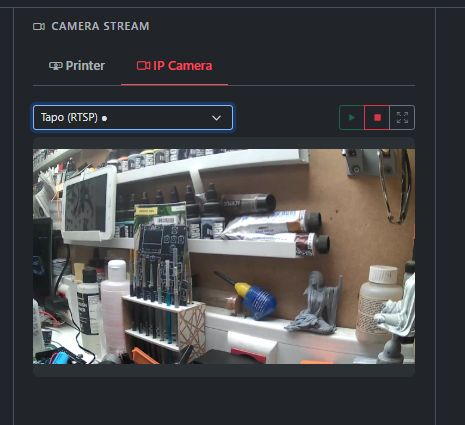
Description
IP Camera Plugin for ChitUI
Stream IP cameras in ChitUI using RTSP, HTTP/MJPEG, or other protocols. This plugin leverages OpenCV with GStreamer and FFmpeg support for robust camera streaming.
Features
- Multiple Camera Support: Add and manage multiple IP cameras
- Protocol Support: RTSP, HTTP/MJPEG, and auto-detection
- Live Streaming: Real-time MJPEG streaming to the web interface
- Easy Configuration: User-friendly settings interface
- Tab Integration: Dedicated "IP Camera" tab in the main interface
- Fullscreen Mode: Click any camera stream to view in fullscreen
- Status Indicators: Visual indicators for active/inactive cameras
Requirements
- Python 3.7+
- OpenCV (opencv-python >= 4.5.0)
- FFmpeg (system package)
- GStreamer (system package, optional but recommended)
Installation
Dependencies will be installed automatically when you enable the plugin.
To manually install dependencies:
pip install opencv-python>=4.5.0
For optimal performance, install FFmpeg and GStreamer:
# Raspberry Pi / Debian / Ubuntu
sudo apt-get install ffmpeg libgstreamer1.0-0 gstreamer1.0-plugins-base gstreamer1.0-plugins-good
# Or for full GStreamer support:
sudo apt-get install gstreamer1.0-tools gstreamer1.0-plugins-bad gstreamer1.0-plugins-ugly
Configuration
Adding a Camera
- Navigate to the IP Camera tab in ChitUI under plugins
- Click Configure Cameras
- Fill in the camera details:
- Camera Name: A friendly name for your camera (e.g., "Xiaomi Camera 2K")
- Protocol: Select RTSP, HTTP/MJPEG, or Auto-detect
- Stream URL: The full URL to your camera stream
- Click Add Camera
Finding Your Camera URL
Different camera brands use different URL formats. Common paths:
- / or /stream - Xiaomi, some IP cameras
- /live - Wyze, some home security cameras
- /video - HTTP MJPEG cameras
- /h264 or /mjpeg - Generic IP cameras
- /onvif - ONVIF-compatible cameras
Check your camera's documentation or use an RTSP scanner tool.
Usage
Starting a Camera Stream
- Go to the IP Camera tab
- Click the Start button on any configured camera
- The stream will appear in the camera card
- Click the stream or the fullscreen button to view in fullscreen mode
Stopping a Camera Stream
Troubleshooting
Camera Won't Connect
- Check Network: Ensure the camera is on the same network as ChitUI
- Verify URL: Test the RTSP URL with VLC or another media player
- Check Authentication: Make sure username/password are included in the URL if required
- Protocol: Try switching between RTSP and HTTP/MJPEG protocols
- Firewall: Check if the camera port (usually 554 for RTSP) is accessible
Stream is Laggy
- Buffer Settings: The plugin uses a buffer size of 1 to reduce latency
- Network: Check your network connection quality
- Resolution: Some cameras allow you to use lower resolution streams (e.g., /stream2 instead of /stream)
OpenCV Errors
If you see "OpenCV not installed" errors:
pip install opencv-python
For better codec support:
$sudo apt-get install libavcodec-dev libavformat-dev libswscale-dev
$pip uninstall opencv-python
$pip install opencv-python --no-binary opencv-python
Technical Details
Architecture
- Backend: Python Flask with threading for camera capture
- Streaming: MJPEG over HTTP (multipart/x-mixed-replace)
- Video Capture: OpenCV with FFmpeg/GStreamer backends
- Frame Processing: Resize to max 1280px width, JPEG quality 75%
- Latency Reduction: Frame skipping and minimal buffering
ChitUi - IP Camera
Add an IP camera to your Setup